Arlo Secure: Home Security
Arlo Technologies, IncLifestyle
4.463.42K Reviews
- Version
- 6.42.0
- Installs
- 5.00M
- Age Rating
- Everyone
Screenshots
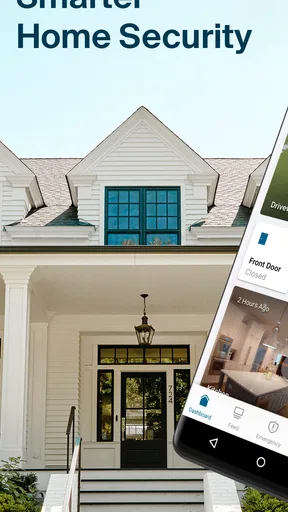
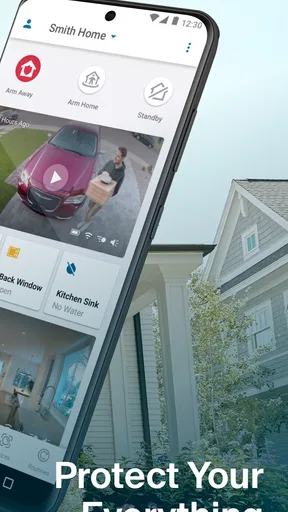
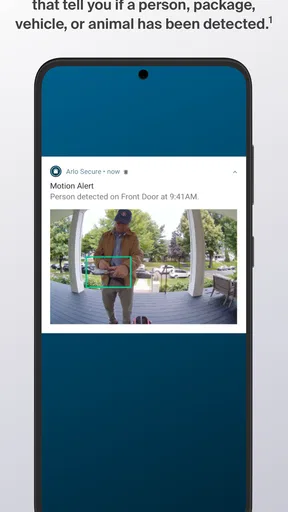
Our Review of Arlo Secure: Home Security
 Analysis by Appyee
I judge a home-security app by a practical question: does it help me make a timely decision, or does it simply give me more notifications to manage? Arlo Secure: Home Security is designed to connect a phone with Arlo security devices, so its value depends on whether you want to check in remotely and shape the alerts you receive. I’d consider it most seriously if you already use, or plan to use, Arlo equipment; it is less compelling as a stand-alone download for someone without compatible devices.
What to decide before you install
Before choosing any camera companion app, I’d think about what I need to know when I’m away: whether a person is at the door, whether a pet is moving around, or whether I simply want a live view. I’d also consider how often I’m willing to check alerts and whether other household members need access. Those questions matter more than a long feature list, because a notification system only helps when its signals are useful to the people receiving them.
Arlo Secure is a free Lifestyle app from Arlo Technologies, Inc. The app itself is free to download, but in-app purchases range from $9.99 to $299.99 per item, so I would check the current options and what each covers before budgeting around it. A free install should not be mistaken for a promise that every service or capability is included at no cost.
The app is rated for Everyone, and its current version is 6.13.0_6130002, with Android 9 as the minimum operating-system requirement. It has passed five million installs, while its average rating is 3.2 from around 179,000 ratings and 60,000 written reviews. That mixed score is a useful reminder to judge the app against your own setup and needs rather than assume that a popular security app will suit every home.
Where a connected Arlo setup can be useful
The strongest case for this app is a household that already relies on Arlo cameras and wants one place to check them. Live viewing can be useful for a quick look at the entryway while you are out, while two-way audio offers a way to speak through a compatible setup rather than merely watch. I would treat that as a practical convenience, not a substitute for deciding in advance how I’d respond to a genuine safety concern.
One everyday example: I’m on the way home and a delivery is expected. If an alert arrives, I can use the app to see what is happening and decide whether I need to ask someone at home to bring the parcel inside. The useful part is not receiving every possible alert; it is choosing notifications that help me act. I’d start with the events I care about, then adjust if routine movement makes the phone too noisy.
Its detection options are another reason to consider it. The review’s feature set describes distinguishing people, animals, and vehicles, which can make a motion alert more informative than a generic “something moved” message. In practice, I’d still think carefully about where a camera points: a busy sidewalk or shared driveway may create activity that is technically detected but not important to me. Changing the view or alert preferences can be more helpful than simply enabling everything.
For a small but useful workflow, I’d set different expectations for different cameras. A front entrance may deserve alerts about people, while a room where a pet spends time may need fewer movement notifications. That keeps the phone focused on events that could change what I do next. It also makes it easier to tell whether an alert is worth opening instead of training myself to ignore the app.
First Impressions and Getting Started
So, diving right into the app, the setup is pretty straightforward. Arlo Secure: Home Security is available on both Android and iOS, so no one's left out. Once you've got it installed, the app guides you through connecting to your Arlo devices. It's almost like having a tech-savvy friend walking you through each step.
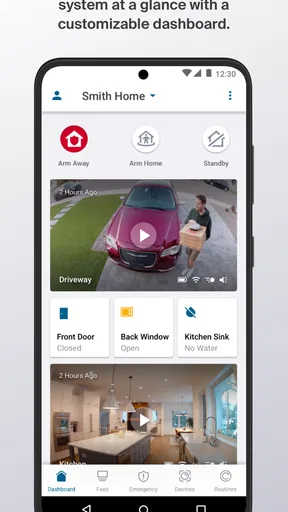
The interface is sleek and user-friendly with intuitive controls. Even if you're not a tech wizard, you'll find navigating the app a breeze. I mean, who doesn’t love a clean design that doesn’t require a manual to operate?
Features That Stand Out
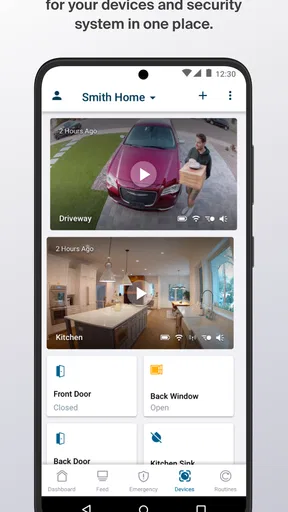
Now, onto the good stuff—features! One of my favorites has to be the live streaming. Yeah, that’s right, you can check in on your home anytime, anywhere. Whether you're at work, on vacation, or just too lazy to get out of bed, you've got eyes on your property. Plus, the two-way audio feature lets you communicate directly through the app. It’s perfect for scaring off a potential intruder or just saying hi to your pets.
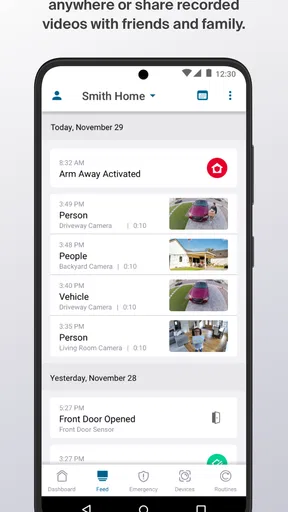
Another standout feature is the advanced AI detection. This isn’t just your average motion sensor; the app can differentiate between people, animals, and vehicles. So, no more false alarms when your neighbor’s cat decides to pay a visit. It’s like having a security system with superpowers.
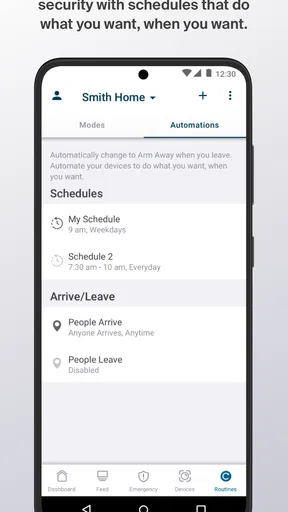
And let's not forget the customizable alerts. You can set up specific alerts based on your preferences. Want to know when someone approaches your front door? Done. Need a heads-up if a package is delivered? Easy-peasy. The app gives you complete control over what you’re notified about, which is a game-changer.
Performance and Reliability
Alright, features are great, but how does Arlo Secure: Home Security actually perform? In my experience, the app is solid. The video quality is crystal clear, especially with compatible HD cameras. No more squinting at grainy footage trying to figure out what's happening.
The app also runs smoothly without any noticeable lags. And trust me, I’ve put it through its paces. Whether it’s switching between cameras or accessing recorded footage, everything works like a charm. It’s reassuring to know that your security system is reliable when you need it the most.
Choosing it over other approaches
Compared with a basic camera app that mainly gives you a live feed, Arlo Secure puts more emphasis on managing alerts and viewing a connected security setup. That can be a better fit if you want to identify the kind of movement that matters and check in from one app. A camera’s own companion app may be simpler if you own only one device and rarely need more than a live view.
A broader smart-home platform can make more sense when your priority is coordinating devices from several brands. I would not switch to Arlo solely for the idea of an all-in-one home dashboard; its clearest purpose is serving Arlo equipment. Likewise, if you want a monitored alarm service or a professionally managed response, compare those categories directly rather than assuming a camera app provides the same kind of support.
There is also a trade-off between detailed alerts and a calm phone. Detection labels can help separate a pet from a person, but no alert system removes the need to tune what counts as important in your home. I’d avoid turning on every notification at once. Start with the entrance or the area you worry about most, live with that setup, and then add more only if the extra information changes a decision.
Costs, household habits, and common snags
Although downloading the app is free, the in-app purchase range means I would look at the specific plan or item before relying on a particular capability. The right question is not simply “Is the app free?” but “Does the option I need fit my budget, and does it cover the way I intend to use my cameras?” If you are still shopping for hardware, compare the whole setup—including the device and any ongoing service you may want—rather than making a choice from the app price alone.
Before inviting family members into a security routine, I’d agree on who should receive which alerts and who is expected to respond. Otherwise, two people may both assume the other has checked an event, or everyone may receive so many routine notices that an unusual one gets overlooked. A short shared rule—who checks the front door, for example—can make the app more useful without changing any settings.
Remote viewing also works best when I remember that a camera view is a snapshot of a moment, not proof of the full context. If a feed is unavailable or an alert arrives late, I would not treat the app as the only way to verify an urgent situation. That is a sensible limitation for any phone-based camera setup, and a reason to keep ordinary home-safety habits in place.
People often wonder whether they need to own Arlo devices before the app is useful. Since the setup is built around connecting to Arlo equipment, I’d choose the app as part of that system rather than install it expecting a phone alone to monitor a home. If you are choosing between Android and iOS, both platforms are supported; on Android, make sure your device meets the minimum requirement before installing.
Another common decision is whether to pay for an in-app option. I’d first identify the exact feature I want, then check its current terms in the app before committing. If the basic setup already answers my needs, there is no reason to buy an option just because it is available. If I need a capability that depends on a paid item, I’d compare that cost with the value of the events or recordings I expect to use.
Who should choose it—and who should look elsewhere
I’d recommend Arlo Secure to someone who owns Arlo devices, wants remote access, and is willing to spend a little time making alerts fit their household. It is particularly suited to people who want a quick view of an entrance, a way to check on pets, or a clearer distinction between kinds of movement. The app’s broad reach—over five million installs—shows it is widely used, but popularity alone should not outweigh the fit of your hardware and routine.
I’d look elsewhere if I do not own Arlo equipment, prefer a single-brand camera app with fewer decisions, or want a security arrangement centered on professional monitoring rather than self-checking video. It may also be a poor fit if I dislike phone notifications or will not maintain alert settings. In those cases, a simpler camera companion, a cross-brand smart-home hub, or a professionally monitored security service may match the priority better.
Wrapping It Up
So, what’s the verdict? If you're looking to upgrade your home security, Arlo Secure: Home Security is a solid choice. It's packed with features that make keeping an eye on your home easier and more efficient than ever. Plus, the app is designed with the user in mind, so you won't find yourself frustrated or overwhelmed.
Whether you're new to smart home security or a seasoned pro, this app has something for everyone. So go ahead, give it a try. Your peace of mind is just a download away.
My recommendation is narrower and more practical: choose it when Arlo cameras are already part of your plan and the ability to review activity from your phone is worth setting up thoughtfully. The free download makes it easy to explore, but I’d make the decision around compatible equipment, alert habits, and any paid option I actually need. For the right household, that combination can make checking home activity feel manageable; for everyone else, a different camera ecosystem or security service may be the more sensible place to start.
Verdict
Strengths of Arlo Secure: Home Security
- User-friendly interface for easy navigation.
- High-quality video streaming and recording.
- Customizable notification settings.
- Wide range of smart home integrations.
- Advanced motion detection features.
Limitations of Arlo Secure: Home Security
- Subscription required for full functionality.
- Can be data-intensive on mobile plans.
- Occasional connectivity issues reported.
- Limited free cloud storage options.
- Setup can be complex for beginners.
Similar Picks in This Category
View All
SmartThings
Samsung Electronics Co., Ltd.4.6

Google Home
Google LLC4.0

Pinterest4.2

Astrotalk - Talk to Astrologer
Astrology & Horoscope4.7

My Verizon
Verizon Consumer Group4.5

Samsung Wallet (Samsung Pay)
Samsung Electronics Co., Ltd.4.1
Frequently Asked Questions
What features does Arlo Secure offer?
Arlo Secure provides a comprehensive suite of home security features, including high-definition video monitoring, motion detection alerts, and two-way audio. It also includes advanced options such as AI-powered person detection, package detection, and cloud storage for recorded footage. The app integrates seamlessly with various Arlo cameras for a complete security solution.
Is a subscription required to use Arlo Secure?
While you can access basic features with a free account, a subscription is required to unlock premium features like 30-day cloud storage, advanced AI detection, and priority support. Different plans are available to suit various needs, allowing users to choose based on the level of security and monitoring they desire.
How user-friendly is the Arlo Secure app?
The Arlo Secure app is designed to be intuitive and user-friendly, catering to both tech-savvy users and those new to smart home technology. Setting up devices is straightforward, with easy-to-follow instructions. The dashboard provides quick access to cameras and alerts, making it simple to monitor your home from anywhere.
What devices are compatible with Arlo Secure?
Arlo Secure is compatible with a range of Arlo security cameras, including the Arlo Pro, Ultra, and Essential series. It supports both iOS and Android devices, ensuring users can access their security system via smartphones or tablets. Additionally, it integrates with smart home systems like Alexa and Google Assistant.
How reliable is the Arlo Secure system for home security?
Arlo Secure is highly regarded for its reliability and robust performance. With its advanced AI detection and real-time alerts, it effectively minimizes false alarms and ensures users are informed of genuine security events. The app’s regular updates and responsive customer support further enhance its dependability.
